A Professional's Take on the New Zenscreen Go Mb16Ahp
The Zenscreen Go MB16AHP is ASUS’s premium entry in the portable monitor category, aimed at professionals who need a compact, full-featured second screen without being tethered to outlets. It blends a 15.6-inch Full HD IPS panel with native battery power, mixed connectivity options, and a slim chassis intended for travel. This article examines the MB16AHP from a practical, buyer-focused perspective: design and build, display performance, connectivity and workflows, battery behavior, common real-world use cases, and whether it justifies its positioning compared with other portable monitors.
Quick overview
At a glance, the MB16AHP distinguishes itself through a built-in battery (one of the few in its class), micro-HDMI plus USB-C inputs, and a thin, lightweight enclosure that includes a folding smart case and a pen-style prop. The monitor targets remote workers, field professionals, and creative users who require a portable, self-powered secondary display. For professionals who travel frequently or need a standby display for client demos, the MB16AHP promises fewer cables and greater flexibility than bus-powered models.
Detailed product review and analysis
Design and portability
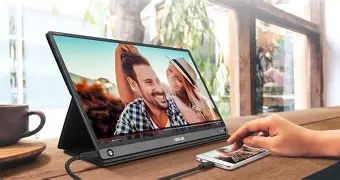
ASUS designed the MB16AHP around portability. The panel is thin and the entire unit is light enough to tuck into a medium-sized laptop bag. The supplied smart case doubles as a protective cover and an adjustable stand; it is a practical solution for on-the-road setups where conventional stands are impractical. A small plastic "pen" (included) fits into a hole on the monitor for an alternate stand arrangement, which is clever though slightly fiddly in practice.
From a professional standpoint, the MB16AHP strikes a sensible balance between durability and weight. The chassis feels solid for a travel monitor, with no obvious wobble in normal use. The trade-off is that the thin profile means it lacks the rigid heft of a desktop monitor—if dropped or subjected to heavy luggage pressure it will not be as forgiving as thicker units.
Display quality and daily use
The MB16AHP uses a 15.6-inch IPS panel with a native Full HD (1920×1080) resolution and a 16:9 aspect ratio. For text, spreadsheets, and most productivity work, the pixel density is adequate and readable at typical viewing distances. Colors are natural and the 178° viewing angles intrinsic to IPS technology mean the screen holds up well during collaborative viewing angles in small meeting rooms.
Brightness is modest compared with desktop monitors—sufficient indoors and in shaded work environments but noticeably challenged under bright window light or outdoors. Professionals who frequently work in bright cafés or in-field will want to verify perceived contrast and brightness at the places they use most. Response time and a 60 Hz refresh rate are standard for portable productivity displays; they are fine for video playback and everyday interaction but not geared toward competitive gaming.
Connectivity and workflow integration
One of the MB16AHP’s strengths is practical connectivity. It offers USB-C (with DisplayPort Alt Mode) and micro-HDMI inputs. The combination allows straightforward pairing with modern laptops and many tablets or phones that support video over USB-C, while micro-HDMI enables connections to cameras, gaming consoles, and legacy devices with the appropriate adapter. For professionals who switch between devices—laptop, camera, camera tethering station, or occasional console—the port options reduce friction.
USB-C supports both video and power, making it possible to run the MB16AHP from a laptop or power bank when the internal battery is depleted. The monitor’s included USB-C to A adapter increases compatibility with older host machines, though some hosts will require drivers or special settings to deliver full DisplayPort functionality over USB-A (an uncommon requirement in typical laptop-to-monitor setups).
Battery life and power behavior
A defining feature is the integrated rechargeable battery. In practice, a built-in battery changes the user model: the monitor can function independently for short client demos, satellite work sessions, or editing on location without a wall outlet. Typical runtimes depend heavily on brightness and workload; moderate brightness and productivity use commonly yield a few hours of use per charge. For extended sessions, the MB16AHP can be powered over USB-C while simultaneously receiving video, which removes runtime anxiety on a desk.
Find top-rated Electronics products at great prices.
Browse Now →For field photographers, consultants, or event technicians, the battery is a meaningful convenience. However, the battery adds weight relative to the lightest bus-powered alternatives, so buyers balancing absolute weight against plug-free convenience should evaluate that trade-off.
Audio, extras and software
The MB16AHP includes small stereo speakers. They provide usable sound for video conferencing and short videos but lack the depth and volume of laptop speakers or dedicated external speakers. Professionals relying on crisp audio for editing or client presentations will still prefer headphones or an external speaker solution.
ASUS’s software suite and display utilities (when available per platform) add conveniences such as auto-rotation and color presets. Calibration out of the box is reasonable for general productivity, but color-critical workflows (photo editing, print proofing) will benefit from hardware calibration or an external colorimeter. ASUS also bundles features intended to reduce eye strain, including Low Blue Light and Flicker-Free modes, which help in long-session scenarios.
Technical highlights (at a glance)
- Screen: 15.6-inch IPS, 1920×1080 (Full HD), 16:9
- Brightness: Moderate — suited to indoor and shaded environments
- Inputs: USB-C (DP Alt Mode) and micro-HDMI
- Audio: Built-in stereo speakers (limited loudness and bass)
- Battery: Built-in rechargeable battery (provides hours of use depending on brightness)
- Portability: Slim chassis, smart folding case, pen prop
- OS compatibility: Windows, macOS, many USB-C devices and micro-HDMI hosts
Comparison: MB16AHP versus a typical USB-C-only portable monitor
| Feature | ASUS Zenscreen Go MB16AHP | Common USB-C-only Portable Monitor (e.g., MB16AC-style) |
|---|---|---|
| Battery | Built-in rechargeable battery for standalone operation | Usually no internal battery — requires host or external power |
| Video Inputs | USB-C (DP Alt Mode) + micro-HDMI | Typically USB-C only (DP Alt Mode) |
| Speakers | Small built-in stereo speakers | Often no speakers or very minimal audio |
| Portability (weight) | Slightly heavier due to battery | Often lighter (no battery) |
| Use-case fit | Better for off-grid demos, travel, and device switching | Better for desk-to-laptop second screen where minimal weight is prioritized |
Pros & Cons
- Pros:
- Portable, self-powered operation via integrated battery — ideal for quick demos and off-grid work.
- Flexible connectivity with both USB-C and micro-HDMI supports more host devices.
- IPS panel with wide viewing angles delivers consistent color and contrast for collaborative review.
- Smart case and pen prop offer practical, travel-friendly stand options.
- ASUS eye-care features reduce fatigue in long sessions.
- Cons:
- Brightness is limited compared with desktop monitors — may struggle in bright environments.
- Built-in speakers are usable but not a replacement for external audio for professional media work.
- Added battery increases weight compared with the lightest bus-powered alternatives.
- Color-critical professionals will likely still require calibration equipment for precise color work.
Buying guide: what professionals should consider
1. Clarify primary use cases
Before buying, professionals should define how they will use the monitor. The MB16AHP excels as a travel companion for productivity, presentations, and tethered camera review. If the primary need is a lightweight, always-on second screen for a fixed desk where power is always available, a lighter bus-powered model could be more attractive. Conversely, for on-site demos where wall power is unreliable, the MB16AHP’s internal battery is a decisive advantage.
2. Evaluate connectivity needs
Confirm the devices that will connect to the monitor. Modern laptops and many Android devices support DisplayPort over USB-C; in those cases, the MB16AHP will plug in with a single cable for power and display. If connecting to cameras, older laptops, or consoles, the micro-HDMI port provides a needed option. Professionals who use cameras for tethered shooting or previewing content should appreciate the micro-HDMI input.
3. Brightness and environment
Consider the brightness of typical work environments. If most work happens outdoors or in sunlit coffee shops, test the display (if possible) or compare measured brightness figures; higher brightness models will perform better in those situations. For indoor offices and co-working spaces, the MB16AHP’s brightness and anti-glare finish are typically sufficient.
4. Color fidelity and calibration
For designers and photographers who demand accurate color, check whether the monitor covers the needed color gamut and how it responds to calibration. The MB16AHP performs well for general content review, but color-critical workflows should plan for a calibration pass with a colorimeter to ensure consistent results across devices and print workflows.
5. Accessories worth adding
- USB-C cable and power bank: If long off-grid sessions are anticipated, pair the monitor with a high-capacity power bank that supports USB-C PD to extend runtime.
- Portable stand: While the supplied smart case is adequate for many angles, a small, rigid travel stand can offer faster deployment and more stable ergonomics in client-facing setups.
- External speakers or headphones: For presentations or media playback where audio matters, bring a compact Bluetooth speaker or wired headphones.
- Colorimeter: For professionals who need accurate color reproduction, a small colorimeter for field calibration is a worthwhile investment.
6. Platform and driver considerations
Most modern hosts will run the MB16AHP without special drivers, but multi-platform households should verify compatibility with their operating systems. macOS, Windows, and many Linux distributions support DisplayPort over USB-C, but specific behaviors (auto-rotation, bundled utilities) may vary by platform. For secondary features like rotation and color profiles, check available software compatibility before purchase.
Find top-rated Electronics products at great prices.
Browse Now →Real-world scenarios where MB16AHP shines
• Field photography: When tethering cameras on location, the MB16AHP’s micro-HDMI and battery let photographers preview images on a larger screen without bringing a laptop or generator for short sessions. This makes quick client reviews and focus checks more efficient.
• Remote consulting and presentations: Consultants touring client sites or working in temporary conference spaces benefit from a self-powered monitor for slide previews and collaborative notes without finding outlet access.
• Developer and productivity workflows: Developers who work on trains, in coffee shops, or alternate between co-working desks can add a second screen for editor/window arrangement to increase throughput without a permanent desk setup.
• Hybrid meeting rooms: As hybrid meetings become commonplace, a portable monitor that can quickly join a host laptop to show shared content provides a tidy, portable visual aid for small huddle rooms.
Conclusion
The ASUS Zenscreen Go MB16AHP is a thoughtfully engineered portable monitor that tilts toward professionals who need flexible, on-the-go display capabilities. Its integrated battery and mixed connectivity make it a practical option for photographers, consultants, and mobile knowledge workers who require short off-grid operation and the ability to connect to a variety of devices. It does not replace a high-brightness desktop monitor or a colorimeter-calibrated studio display for critical color work, but it fills a valuable niche: a durable, full-featured second screen that reduces dependency on outlets and adapters during travel.
Ultimately, buyers should weigh the convenience of the internal battery and added ports against slightly increased weight and moderate brightness. For anyone who frequently moves between locations or who needs a portable, reliable display for client-facing work, the MB16AHP represents a compelling, practical choice.